
AI coding assistants cut the time it takes to write and change code. But faster code doesn’t mean faster delivery. If development output goes up while testing capacity stays the same, defects, security issues, and regression risk move downstream faster.
That’s the real question behind AI software testing for most engineering leaders. It isn’t about AI in test automation, like which tool writes the best test cases. It’s how your testing strategy, quality gates, and CI/CD pipeline need to change now that developers write code faster with AI.
What changes when developers start using AI-generated code?
The pace changes first. The fundamentals of software quality don’t.
Teams using AI coding assistants usually see more pull requests, faster iteration, and a bigger regression surface. Developers also accept code they didn’t reason through line by line. That code can compile and pass a quick check while still missing an edge case, a permission check, or a business rule.
Google’s 2025 DORA report found that AI adoption now has a positive link to delivery throughput but still a negative link to delivery stability. DORA’s explanation: without strong automated testing, mature version control, and fast feedback loops, more change volume leads to more instability.
Why existing test automation may not be enough?
Most test suites were built for a slower flow of changes. When code arrives faster, every slow or unreliable step turns into a queue. The common weak spots are:
- Slow regression suites that make changes wait for results
- Brittle UI tests that break on small layout changes
- Thin integration testing between services, APIs, and databases
- Flaky tests that teach people to ignore red builds
- Security checks that run only before release
- Manual approval steps that grow with change volume
None of these problems is new. AI just makes them harder to ignore.
Does AI-generated code need more testing?
Not automatically. It needs the right amount of testing for its risk, like any other code. GitHub’s Copilot documentation tells developers to review and test generated code, with extra care for security-sensitive applications.
Base testing depth on risk, not on who wrote the code. Look at criticality, change size, data sensitivity, dependencies, user impact, security exposure, and business logic. A generated date formatter needs no extra scrutiny. A generated change to refund calculations does, and it would if a person had written it too.
How should test automation change for AI-generated code?
The goal is fast, trustworthy feedback on every change, with deeper checks where the risk is higher.
Run tests earlier
Unit tests, linting, static analysis, and basic security checks should run on every pull request and finish in minutes. These cheap checks filter out obvious problems, so reviewers can focus on the hard ones.
Expand automated regression coverage
More changes mean more chances to break what already works. Start with the workflows that would hurt most if they failed, like checkout, login, and billing.
Strengthen API and integration testing
AI tools usually see only part of your system. Generated code can work in isolation and still fail at a service boundary because of a wrong field name, a schema mismatch, or a bad queue message. API and integration tests catch these problems faster and more reliably than UI tests.
Increase security testing
AI-generated code isn’t automatically insecure. But it should pass the same security controls as other code, or stronger ones where the risk calls for it: SAST, dependency checks, secrets detection, and permission checks.
Dependencies need extra care. A USENIX Security 2025 study tested 16 code generating models and found that every one sometimes suggested packages that don’t exist. Attackers can register those names and fill them with malicious code. Block unknown packages in your pipeline.
Improve test data management
Use stable, representative, and safe test data. That means synthetic or masked records, seeded edge cases, and environments that reset to a known state before each run.
Reduce flaky tests
A flaky test passes and fails on the same code. Google’s Testing Blog notes that when tests give false signals often, people start ignoring real failures too. Quarantine flaky tests, then fix or delete them.
Make CI/CD quality gates risk-based
Send low-risk changes through a fast automated path. Route higher-risk changes to deeper tests and a required human review.
How much testing does an AI-generated change need?
Use this table as a starting point, then adjust it to your systems and compliance needs.
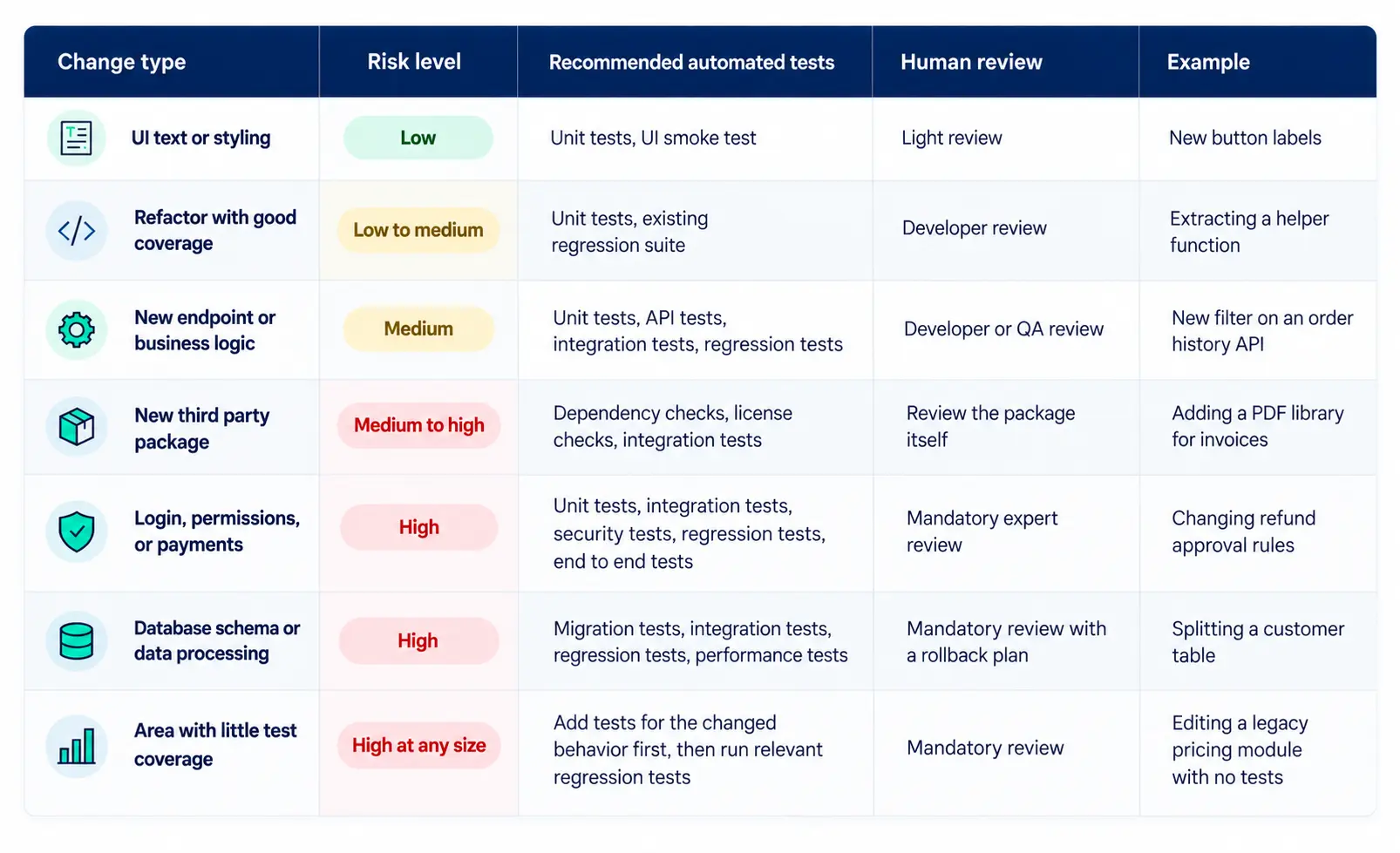
The last row is easy to miss. Low coverage makes even a small change risky, because nothing will tell you it broke.
What should humans still review?
Human review should get more focused, not disappear. Keep people on business logic, architecture decisions, security-sensitive code, compliance requirements, high-impact workflows, unexpected abstractions the AI added, complex edge cases, and anything with thin test coverage.
GitHub’s guidance for its Copilot code review feature says the same thing: use AI review to supplement human review, not replace it. It also helps when authors note in the pull request which parts were AI-generated and how they checked them.
Should developers be responsible for more testing?
Yes, but quality becomes shared, not handed off. Developers should own unit tests, basic integration tests, static analysis, security scan results, and code that’s easy to test. QA teams should focus on a risk-based strategy, automation architecture, cross-system validation, exploratory testing, performance, security, and release confidence.
One caution: if AI writes both the code and its tests, both can share the same wrong assumption. That’s why QA’s independent view still matters.
How should QA teams prioritize testing?
Score each change by customer impact, financial impact, security, data sensitivity, compliance, change size, dependency count, and business criticality. Then match the testing to the score.
| Risk level | Typical signals | Automated testing | Human review |
| Low | Small change, no sensitive data, good coverage | Unit tests, linting, static analysis, smoke tests | Standard peer review |
| Medium | New logic, touches an API or shared code | Fast checks plus API, integration, and targeted regression | Peer review plus QA check of coverage |
| High | Payments, login, sensitive data, schema changes, or low coverage | Full regression, security, end-to-end, and performance where needed | Domain owner review plus QA approval |
Keep it simple enough to use. A short checklist in the pull request template beats a scoring spreadsheet nobody opens.
What should an AI era test automation pipeline include?
Run fast checks on every change and save deep checks for changes that need them. A typical order:
- Code commit: formatting and secrets detection
- Unit tests, linting, and static analysis on every pull request
- Security and dependency checks
- API and integration tests for changes that touch services
- Regression tests, targeted on merge and full before release
- Performance checks for high-risk changes
- Environment validation and smoke tests in staging
- Release approval, with human sign-off for high-risk releases
- Production monitoring with fast rollback
The first two steps should finish in minutes. If they don’t, developers will find ways around them.
What metrics should engineering and QA leaders track?
Track whether software reaches users safely, not how many tests you have. Useful measures include change failure rate, escaped defects, regression defect rate, flaky test rate, test execution time, time spent waiting for test results, the stage where defects are caught, mean time to detect and recover, release frequency, lead time, production incidents, and coverage of business-critical workflows. Several of these match the DORA software delivery metrics.
Faster development isn’t a success if defects, rework, or incidents rise along with it.
Common mistakes when testing AI-generated code
- Trusting code because it compiles
- Adding more tests instead of better ones
- Relying too heavily on UI automation
- Running the full regression suite on every commit
- Ignoring integration and security risks
- Leaving flaky tests in the pipeline
- Letting AI write the code and its tests with no independent check
- Removing human review too early
- Measuring success only by development speed
How should enterprises update their test automation strategy?
- Find where AI coding tools are in use. Check real usage, not just the approved list.
- Measure your test automation health. Record run times, flaky test rate, coverage, and change failure rate as your baseline.
- Find the bottlenecks. Look at where pull requests wait the longest.
- Speed up the fast checks. Make them run on every pull request in minutes.
- Expand coverage. Add regression, API, integration, and security tests, starting with critical workflows.
- Add risk-based quality gates. Route changes by risk.
- Measure and adjust. Compare production quality to your baseline and tune the gates.
AI-generated code changes development speed. Testing has to keep up.
AI-assisted development can increase code output, but your quality systems must grow with it. Otherwise, the gains turn into rework, incidents, and slower releases. The goal isn’t to slow developers down. It’s to make faster development safe enough to keep.
If your regression suite keeps growing, test feedback slows, or QA becomes the bottleneck as releases speed up, it may be time to review your automation strategy. ACME One’ssoftware quality assurance and test automation services help engineering teams find those bottlenecks, build reliable CI/CD testing, and focus coverage where it matters. For example, see how ACME One built QA automation for a high-traffic fashion platform.