Many companies move to the cloud expecting a smaller infrastructure bill. Then the first invoices arrive, and the number is close to what the data center cost. Sometimes it’s higher.
This happens a lot after a lift and shift migration. The workloads moved, but the way they use resources didn’t. Servers sized for an old peak still run at that size. Test environments still run all night. Nobody owns the bill line by line.
Microsoft’s Cloud Adoption Framework says rehosting doesn’t fix existing performance, reliability, or architecture problems. It carries them into the cloud. Cost works the same way.
This article explains why costs stay high after lift and shift, which problems a configuration change can fix, and which need deeper work. If the problem comes from workloads that were moved without changing their deployment model, a broader review of cloud migration and modernization may be necessary.
Why lift and shift keeps cloud costs high
Lift and shift copies your on premises setup into the cloud. In a data center, you paid for hardware up front, so spare capacity cost nothing extra once you owned it. In the cloud, you pay for every hour a resource runs, busy or not.
Most of the waste after migration comes from that change in pricing.
Servers sized for the old peak. On premises teams size servers for the busiest day of the year, plus a margin, because new hardware takes weeks to arrive. Copied one to one, those sizes become cloud instances that sit mostly idle.
Everything runs all the time. Data center servers stay on because turning them off saves little. In the cloud, that habit gets expensive. The AWS Well Architected cost optimization design principles give an example: running development and test environments for a 40 hour working week instead of all 168 hours can cut their cost by about 75 percent.
Leftovers keep billing. Snapshots, unattached disks, old load balancers, and test copies made during cutover often outlive the project. Each one is small. Together they add up.
Licenses move without review. Database and operating system licenses often move as they are. Programs such as Azure Hybrid Benefit can lower that cost, but only if someone checks which licenses qualify.
Storage stays on one tier. Backups, logs, and old exports often sit on the same fast storage as live data, even though nobody reads them. Lifecycle policies can move that data to cheaper tiers or delete it after a set period.
Microsoft’s guidance on optimizing workloads after migration recommends comparing costs against the premigration baseline, then looking for over provisioned resources and misconfigured scaling policies.
These are configuration problems. Rightsizing, schedules, cleanup, and commitment discounts can fix them in weeks, so they come first. When they’re done and the bill is still high, the cause is usually deeper.
When the architecture is the cost problem
Some costs don’t move after rightsizing. That usually means the workload’s structure is the cause.
Common signs:
- The application can’t scale out, so it runs on one large server sized for peak load.
- Session data or files live on local disk, so instances can’t be added or removed safely.
- Small components each run on their own virtual machine, even when they see little traffic.
- Data crosses regions or leaves the cloud more often than it needs to, and transfer charges grow.
- Databases, queues, and caches are self managed, so each needs extra servers for high availability, backups, and patching.
A configuration change won’t fix any of these. The AWS design principles advise teams to stop spending money on undifferentiated heavy lifting and hand that work to managed services. The Google Cloud Well Architected Framework cost optimization pillar makes a related point: when you compare resource options, count the cost of managing them, not only the cost of running them.
Take a self managed database on two virtual machines. On the invoice, it may look cheaper than a managed database service. Add patching, backups, failover tests, and the engineer hours behind them, and the comparison often flips.
A cloud architecture review looks at these choices directly: how each workload scales, where its data lives and moves, and which components should become managed services. It tells you whether the remaining cost is a setting or a design decision.
Environments, automation, and ownership
Lift and shift often moves the old operating model along with the servers. Servers are built by hand. Environments are requested by ticket. Nobody can say which team owns a given resource.
That model creates cost in three ways.
Environments nobody tears down. A test environment built by hand takes days to rebuild, so teams keep it running just in case. With infrastructure as code, the same environment can be created for a test run and removed when the run ends.
Drift between environments. When each server is set up by hand, sizes and settings drift apart. Some copies end up far larger than they need to be. Nobody notices, because there’s no template to compare against.
No owner for the bill. If resources aren’t tagged by team, product, and environment, finance sees one large number and engineers can’t see what their choices cost. The AWS principles call for attributing spend to workload owners so they can act on it.
The FinOps Foundation describes FinOps as an operational framework and cultural practice that creates financial accountability through collaboration between engineering, finance, and business teams. That collaboration needs engineering habits behind it: tagging rules that are enforced, schedules for non production environments, and budgets with alerts.
Most of those habits are DevOps practices. CI/CD pipelines can apply tags and policy checks before anything reaches production. Infrastructure as code makes environments cheap to delete and recreate, so teams stop paying for idle copies.
When workloads need modernization
Some workloads can’t get cheaper through settings or better operations. The code itself assumes a fixed, always-running server.
You’ll usually see one or more of these:
- The application needs a full virtual machine or a specific OS version, so it can’t move to containers or a managed platform.
- One large codebase has to scale as a single unit, even when only one feature is busy.
- Batch jobs run on servers that sit idle for the rest of the day.
- Scheduled scripts, shared file drives, and manual steps hold the system together.
For these workloads, the real choice is between keeping the current cost and changing the application. Options include moving to a managed runtime, running batch work on scheduled or event driven compute, splitting out the busiest part of a monolith, or retiring a system that no longer earns its cost.
The same Cloud Adoption Framework guidance suggests rehosting only when a workload will likely stay as it is for at least two years. If change is likely, it points to refactoring or rearchitecting instead, so the work isn’t done twice.
Application modernization starts with deciding which workloads are worth changing. Not every legacy system is. A small internal tool that costs little to run can stay as it is. A customer facing system that scales poorly on oversized servers usually can’t.
Where to start
Work from the cheapest fixes to the deepest ones. Each step gives you the data for the next.
- Set a baseline. Compare current spend with the premigration estimate, workload by workload, so you know where the gap is.
- Tag resources and name owners. Every resource gets a team, a product, and an environment tag.
- Remove the obvious waste. Delete leftovers, schedule non production environments, and rightsize using a few weeks of real usage data.
- Buy commitments last. Reserved instances and savings plans make sense for steady load, but only after rightsizing. Buy them earlier and you lock in the waste.
- Automate environments. Move builds to infrastructure as code and add policy checks to your pipelines.
- Review the architecture. Look at workloads whose cost stayed high after steps 1 to 5.
- Modernize selectively. Change the applications where the code is the cost driver, and retire the ones that aren’t worth keeping.
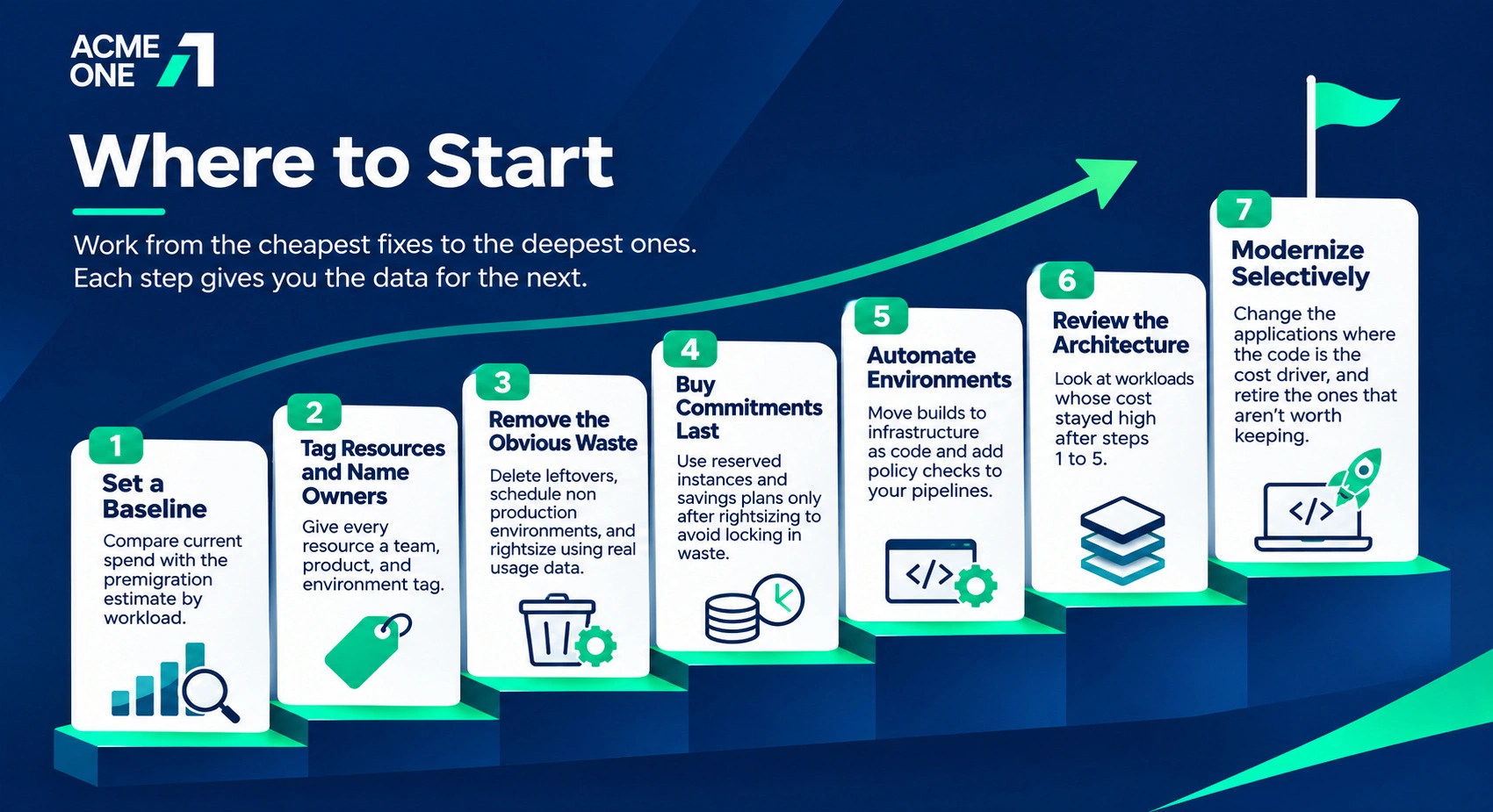
Steps 1 to 4 often take a few weeks. Steps 5 to 7 take longer, because they deal with causes that settings can’t reach.
Track progress with a unit cost, not only the monthly total. Cost per customer, per order, or per transaction shows whether spend is growing with the business or growing on its own. A total that rises while unit cost falls is usually healthy. The reverse means waste is creeping back.
The migration was the first step
Lift and shift is a reasonable way to leave a data center quickly. It isn’t a cost plan on its own. The bill comes down when workloads match real demand, environments are automated, owners can see their costs, and the systems that can’t change are modernized or retired.
If your cloud bill hasn’t dropped since the move, ACME One’s cloud migration and modernization team can review where the money goes and sort each fix into configuration, architecture, or code.