A regional logistics company runs orders through its ERP, tracks drivers in a separate app, and reconciles delivery exceptions in spreadsheets. It wants one system that connects all three. A vendor demo covers most of the workflow and fits the budget. A development partner says a custom build would match it exactly, at a higher upfront price.
Comparing those two quotes won’t settle it. The subscription grows with every user and add-on. The custom build keeps costing money after launch. Both carry integration and exit costs that neither quote shows. This guide compares total cost of ownership, scalability, integrations, and control for custom software vs. off-the-shelf solutions, then offers a framework for choosing to build, buy, or combine both.
Custom Software vs Off-the-Shelf Software: What’s the Difference?
Custom software (sometimes called bespoke software) is built around one organization’s requirements. You decide the features, data model, and release schedule. Code ownership depends on the contract: some agreements assign it to you, others only license it. Hosting, security, and maintenance duties depend on your support agreements.
Off-the-shelf software, also called commercial off-the-shelf (COTS), is a packaged product sold to many customers. It may be SaaS, vendor-hosted, or licensed to run on your own servers. Large CRM and ERP platforms allow extensive customization, though it adds cost and upgrade effort. You still work within the vendor’s core product and roadmap.
| Factor | Custom software | Off-the-shelf software |
| Initial investment | Usually higher: discovery, design, build, testing | Usually lower: licenses, setup, configuration |
| Implementation time | Depends on scope and integrations, often months | Depends on configuration, integrations, and migration |
| Customization | Shaped to your process | From settings only to extensive platform customization |
| Scalability | Depends on architecture, infrastructure, and code quality | Depends on product limits, hosting model, and pricing tiers |
| Integrations | Built for your systems, maintained by you or a partner | Prebuilt connectors and APIs, within vendor limits |
| Maintenance | Set by your support agreement | Vendor updates the product; you maintain configuration |
| Code ownership | Defined by contract | Stays with the vendor; you hold a license |
| Vendor dependency | Shifts to your development partner and technology stack | Vendor controls pricing, features, and roadmap |
Cost Comparison: Initial Investment vs Long-Term Ownership
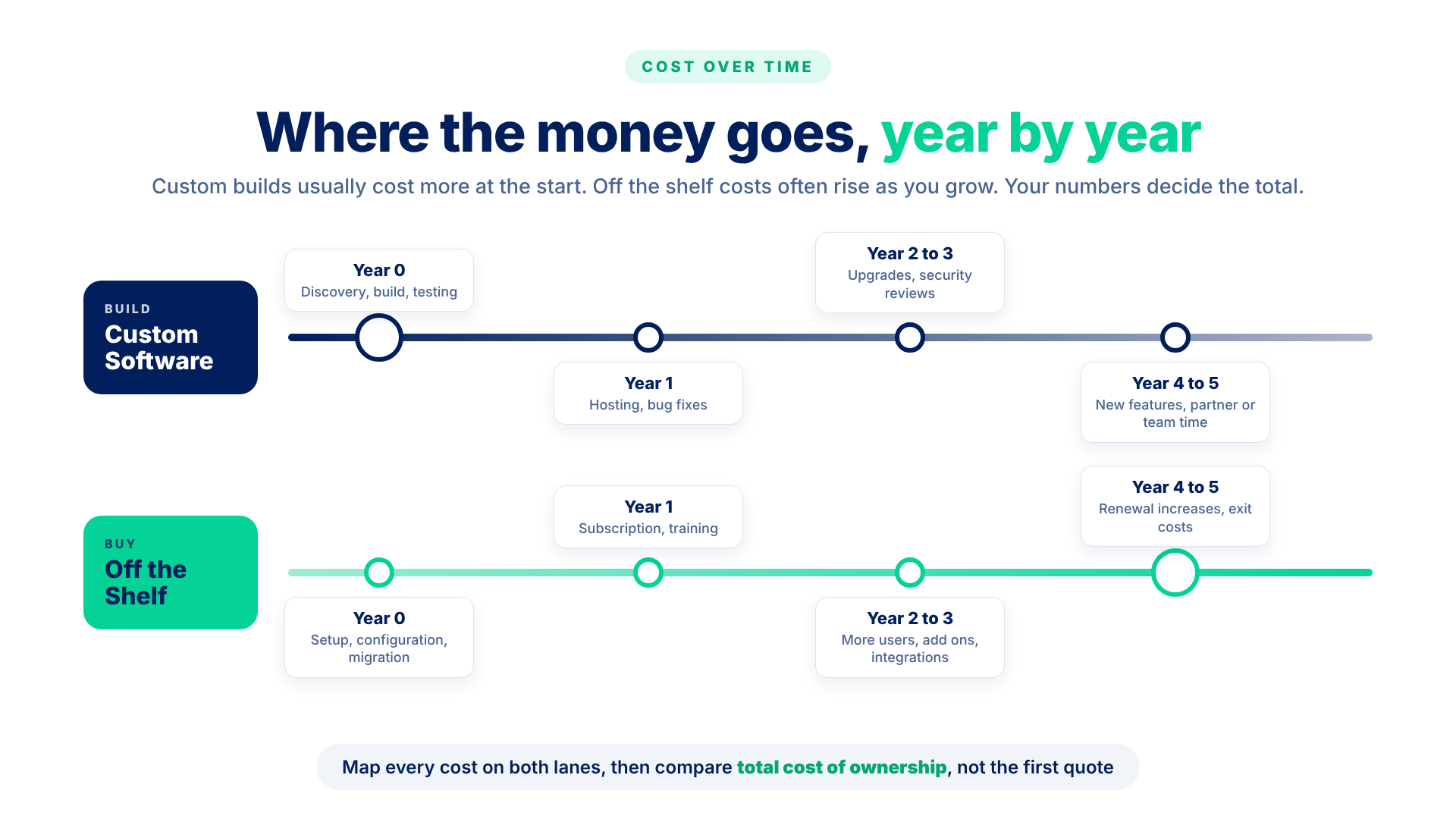
Total cost of ownership (TCO) is everything you spend to acquire, run, change, and eventually leave a system. A lower upfront price doesn’t guarantee a lower lifetime cost for either option.
| Cost category | Custom software | Off-the-shelf software |
| Initial build or purchase | Discovery, design, development, testing | Licenses or first term |
| Implementation | Deployment, setup, training | Configuration, training, consultant fees |
| Subscription and licensing | Third-party components and services | Recurring fees, often per user |
| Hosting | Cloud costs, monitoring, backups | Included in SaaS; yours if self-hosted |
| Maintenance and upgrades | Bug fixes, patches, framework upgrades | Retesting after vendor releases |
| Integrations | Building and maintaining APIs | Connectors, middleware, custom work |
| Internal support | Product ownership, help desk | Administration, vendor management |
| Pricing changes | Partner rates and cloud pricing | Renewal increases, tier changes, retired plans |
| Data migration and exit | Moving data in; handover to a new partner | Moving data in; exporting it to leave |
Real figures depend on scope, users, data volume, and contract terms, so “how much does custom software development cost” only has a useful answer after discovery.
To calculate TCO over three to five years:
- Make one sheet per option: cost categories as rows, years as columns.
- Fill year one with real quotes, including license pricing at your projected headcount.
- Add recurring costs and internal staff time for later years. Use the contract’s renewal terms, not today’s list price.
- Add an exit or migration cost in the final year, even if you plan to stay.
- Rerun each total with faster user growth and more change requests. The option whose total moves less carries less financial risk.
Scalability, Integrations, and Technical Flexibility
Both approaches can scale. The difference is who sets the limits and who does the work.
With SaaS, the vendor absorbs growth in users and transactions, often through higher pricing tiers, API rate limits, or storage caps. Self-hosted products put capacity planning back on your team. A missing workflow step means waiting for the vendor or building a workaround.
With custom software, you control the limits and carry them. Performance under load depends on architecture choices, such as how data is partitioned, cached, and queued, and on implementation quality. The AWS Well-Architected Framework treats performance efficiency as matching resources to changing demand.
On integrations, check that a product exposes APIs for the data and events you need, that legacy applications can connect without fragile middleware, and that you can export your data in a usable format.
Security responsibility shifts too. Under Microsoft’s shared responsibility model, customers stay responsible for their data, accounts, and access in every service model, SaaS included. A custom build adds application code to that list, so the NIST Secure Software Development Framework and the OWASP Top 10 become your concern. Neither option is secure by default.
When Should Businesses Choose Custom Software?
Custom development is easier to justify when the software shapes how you compete or operate.
- Specialized workflows. If your process is why customers choose you, a generic tool may cost more in workarounds than building it.
- Complex integrations across several systems. When an ERP, a warehouse system, and partner portals share data in near real time, purpose-built logic can be simpler than stacked connectors.
- Specific regulatory or security needs. Some data residency, audit, or access rules are hard to meet in a multi-tenant product.
- Unique product requirements. A customer-facing platform that defines your offering rarely fits a packaged product.
- Limits of existing solutions. Nothing on the market fits without heavy workarounds.
- Long-term control. If a vendor’s pricing or roadmap change would put the business at risk, control has real value.
The tradeoffs: custom projects carry delivery risk, take longer to show value, and need a maintenance budget for as long as the software runs.
When Does Off-the-Shelf Software Make More Sense?
Buying is often the better decision. Off-the-shelf software usually fits when:
- The process is standard, such as payroll, accounting, or basic CRM
- The implementation budget is limited
- You need the system running within weeks
- Established platforms cover most requirements
- You don’t have an engineering team to maintain custom code
The benefits of off-the-shelf software include faster deployment, predictable early costs, vendor-managed updates, and a large user community. Its disadvantages tend to appear later, so before signing, review the API documentation, renewal terms, data export options, and support guarantees.
Can a Hybrid Approach Offer Better Value?
Often the best answer is to buy the standard parts and build what makes you different.
Hypothetical example: a field services company adopts an established CRM for sales and customer records. Its scheduling and dispatch rules are specific to its operations, so it builds a custom integration layer and a small dispatch application that reads from the CRM through its API. The company avoids rebuilding contact management and keeps control of the logic that matters.
The catch: each integration needs monitoring, testing, and an owner who updates it when the vendor changes its API or data model.
A Practical Framework for Making the Decision
Answer these six questions with business and technical stakeholders.
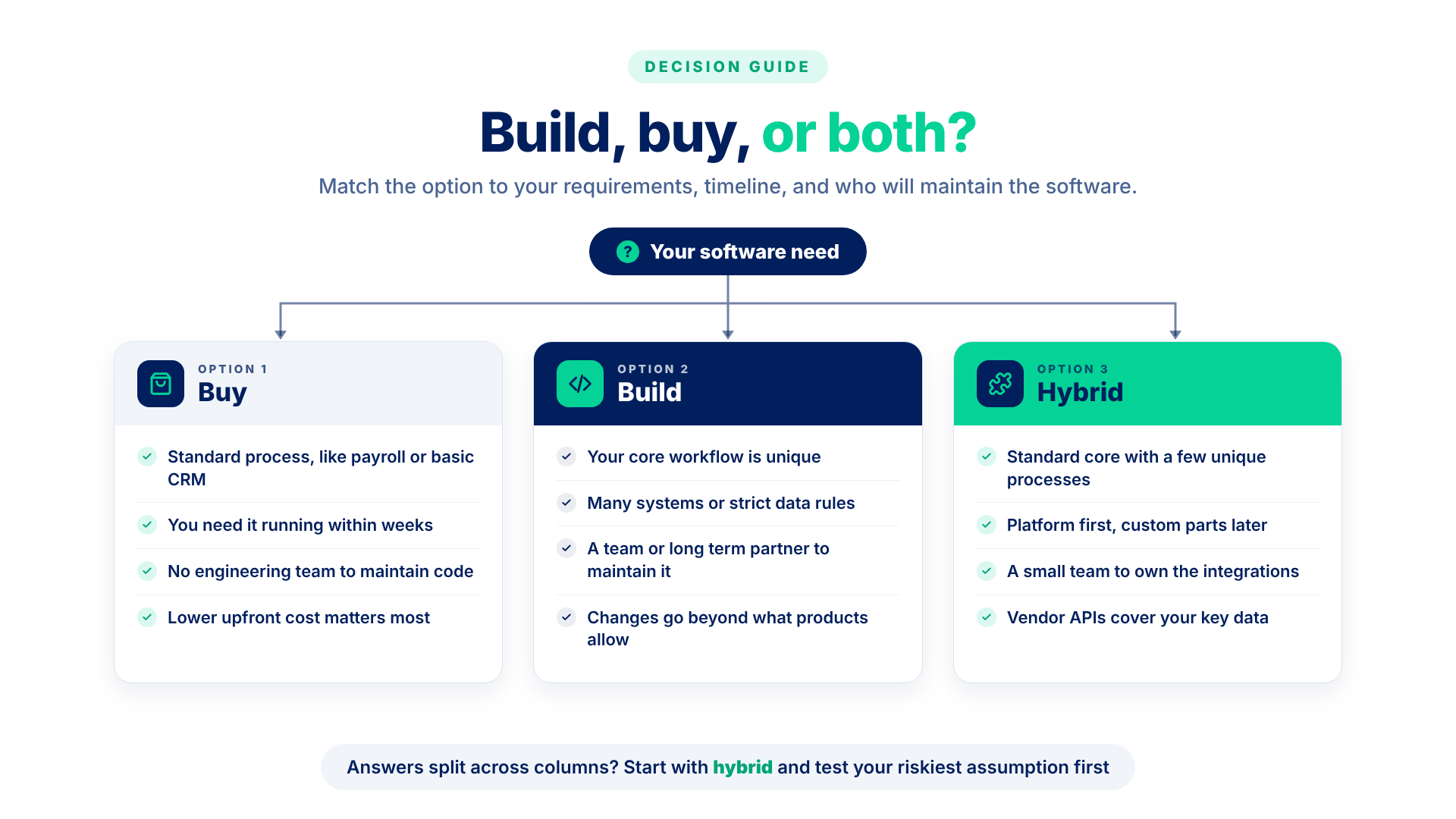
| Question | Points to buying | Points to building | Points to hybrid |
| 1. How unique are the requirements? | Mostly standard | The core workflow is unique | Standard core, a few unique processes |
| 2. What is the three- to five-year TCO? | Lower at projected scale | Lower once license growth and workarounds count | Platform plus a limited build |
| 3. How fast must it be deployed? | Within weeks | Months are acceptable | Platform first, custom parts later |
| 4. How much customization is needed? | Configuration is enough | Changes go beyond what products allow | Extensions through APIs |
| 5. What integration and data control is needed? | Vendor connectors cover it | Many systems, strict data rules | A few critical integrations |
| 6. Who will maintain it? | No engineering team | A team or long-term partner | A small integration team |
If most answers land in one column, that’s your likely direction. If they split, start from the hybrid option and test the riskiest assumption first, often an integration or per-user pricing at scale.
Final Thoughts
The build vs buy software decision comes down to fit, cost over several years, and how much control you need. A cheap subscription can grow expensive at scale, and an ideal build can become a burden without a team behind it.
If your answers point toward building or a hybrid setup, ACME ONE’s custom software development team can help you test that conclusion first. A discovery workshop maps requirements, integration points, and ownership costs before you commit to development, so the decision rests on your own numbers.