

Patagonia’s integration team relied heavily on BizTalk Server to manage system communication between applications. BizTalk ports and host instances were responsible for sending and receiving critical business data across systems. Over time, managing these services became repetitive and time sensitive. Enabling or disabling ports and instances required manual intervention from the cross-functional team. Even though the process worked, it took time and enhanced the risk of human error.
The client faced a clear operational issue.
BizTalk services had to be enabled or disabled based on specific schedules. Previously, this was done manually by the integration team.
Key challenges included:
The client wanted an authentic way to mechanize these routine actions, while maintaining control and security.
The client aimed to:
The goal was to replace repetitive manual tasks with a mechanized workflow.
Acme One designed a solution using Azure Automation Runbooks.
We developed PowerShell based runbooks within an Azure Automation Account. These runbooks were configured to execute at predefined times through scheduled jobs.
Each scheduled job combined a runbook with a specific schedule, allowing precise timing control.
Because BizTalk was hosted on premises, we established a secure hybrid connection between Azure and the client’s local environment.
The workflow operated as follows:
To ensure controlled execution across environments, four dedicated runbooks were created:
This separation provided flexibility and minimized the risk of affecting the wrong environment.
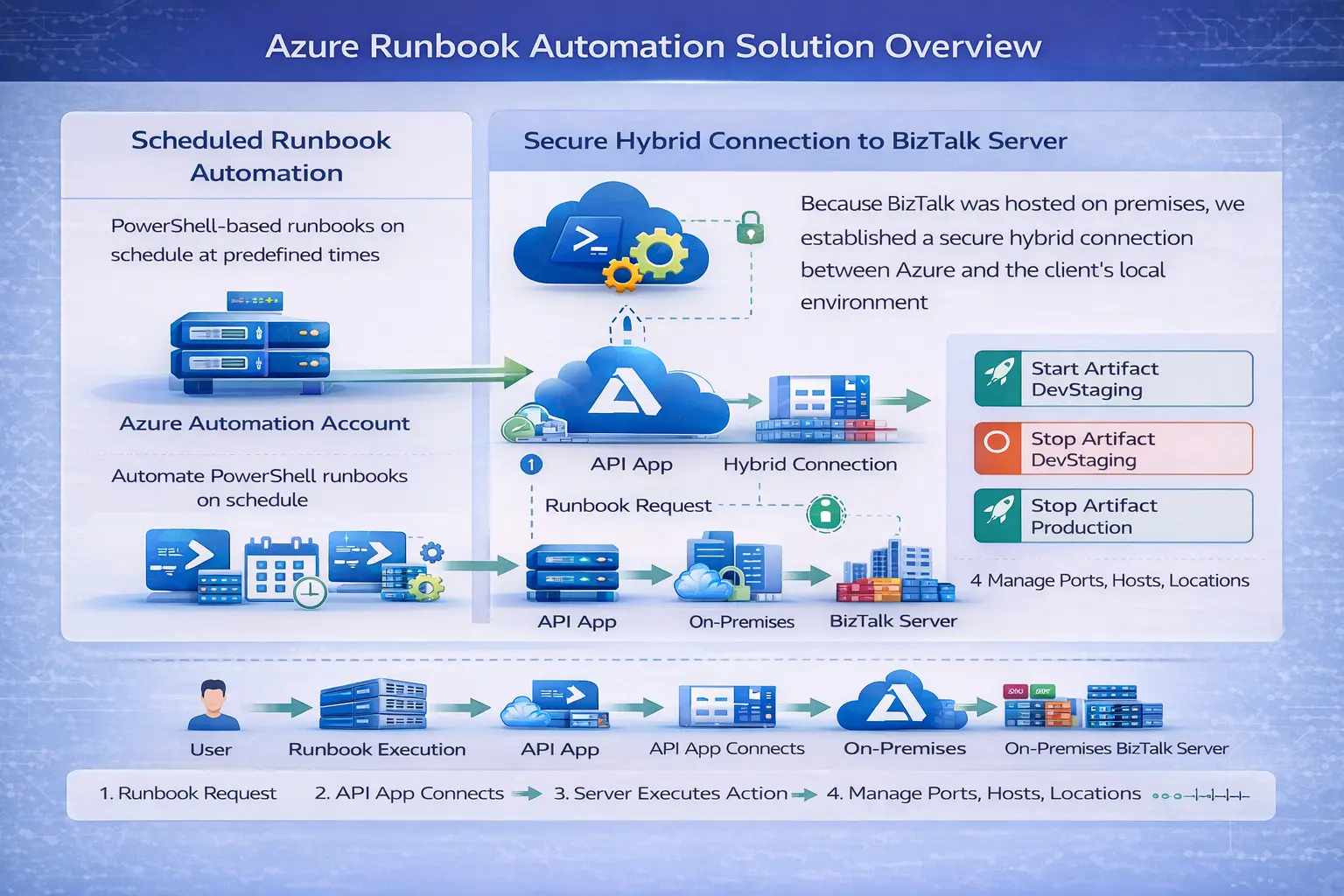
The solution was implemented using:
Don’t just take our word for it. Hear what our satisfied clients have to say about their experience partnering with ACME ONE



We’re here to help! If you have any questions or would like to discuss.
We’re here to help! If you have any questions or would like to discuss how our IT services and technology solutions can benefit your business,
Meydan – Nad Al Sheba – Dubai – United Arab Emirates
+971 50 952 6681
info@acme-one.com
Monday - Friday: 9.00 - 6.00
Saturday & Sunday (Closed)
We’re here to help! If you have any questions or would like to explore how our custom software, digital solutions, and IT expertise can support your business growth.